Prototype x-OSC Gloves Kit
Prototype x-OSC Gloves Kit for team to use in development. It is a self-contained, pre-configured kit ready to run out of the box (or bag). It also represents something what we want to eventually put together as a product.
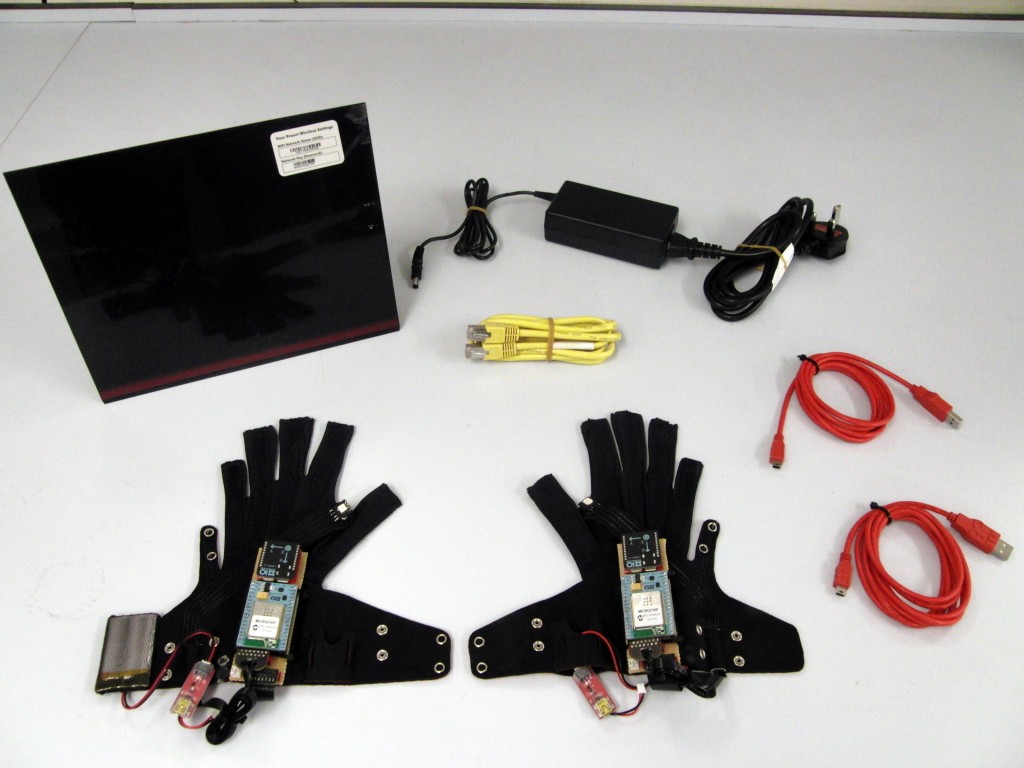

Contents
- Left Glove
- Right Glove
- USB cables x2 (for charging gloves)
- Router + power cable
- Ethernet cable
Quick start guide
- Connect computer to router using Ethernet cable
- Turn on gloves (connect battery)
- Watch the gloves data come streaming in (left = Port 8111, right= Port 8222)
Extra notes
- Gloves static IP = 192.168.0.111 (left) and 192.168.0.222 (right)
- Gloves send to 255.255.255.255 on port 8111 (left) and 8222 (right)
- Gloves listen on port 9111 (left) and 9222 (right)
- Flex sensor update rate at 20 Hz
- IMU & quaternion update at 128 Hz
- Router does not broadcast SSID (hidden Network). If you want to connect via WiFi then you need to do it manually: SSID=”Gloves Router“, security=none
- Router DHCP enabled: Your computer can be assigned an IP address just like normal.
- The gloves can be used while charging
The router, x-BIMUs and x-OSCs are preconfigured and ready to go. The following settings were used, unspecified settings are left default values.
x-BIMU Settings (firmware v0.7)
- QUAT_RATE = 8
- SENS_RATE = 8
- BATT_RATE = 0
- BIN_PACKETS = 1
- AHRS_NO_MAG = 1
x-OSC Settings (firmware 0.4)
- Network Type: “Infrastructure”
- SSID: “Gloves Router”
- Security = “Open”
- Use DHCP: unchecked
- IP address: “192.168.0.111″ (Left), “192.168.0.222″ (Right)
- Port (outgoing) = “8111″ (Left), “8222″ (Right)
- Port (incoming) = “9111″ (Left), “9222″ (Right)
- Sample Rate: 20 Hz
- Input 1: Serial
- Channel 1 Buffer Size: 32
- Channel 1 Timeout/ms: 1
Netgear D6300 Router Settings
- Enable SSID Broadcast = unchecked
- Security Options = “None”
- Mode = “Up to 300 Mbps”
- Name (SSID) = “Gloves Router”
must… have… *drool*
love the gloves would love to have them and the software someday!
Can´t.wait.for.this.must.have!!!!!!
Excellent project. When it will be available like product?
I would like to have one.
Thanks